Disney Coloring World
- 4.3
- Rating
- 10.00M
- Installs
- Free
- Price
 Analysis by App-foxy
I approached Disney Coloring World as a quiet creative game rather than a traditional level-based challenge. Its central appeal is simple: I can color familiar Disney characters and scenes, then spend time refining the picture instead of trying to beat a timer or master complicated controls. That makes the game especially easy to understand for children, but it also gives parents a low-pressure activity to share with them.
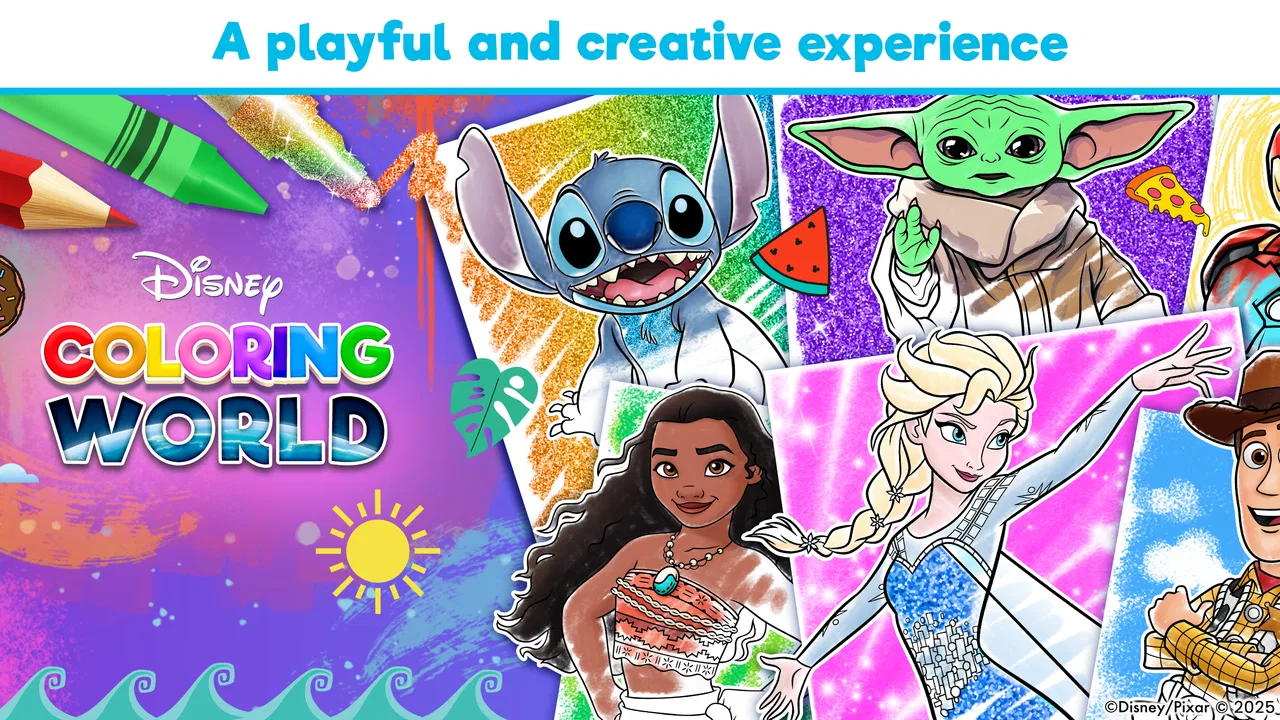
Developed by StoryToys, this educational game is free to start and is suitable for Everyone. It brings together characters from Frozen, Disney Princesses, Stitch, and other Disney worlds in a format that feels more like a digital coloring book than a conventional game. The important distinction is that the licensed characters provide an immediate reason to open the app, while the coloring itself is the feature that determines whether it stays useful after the first few minutes.
In my experience, the strongest part of the app is not simply choosing a color. It is the way coloring turns recognition into a small creative decision: I know the character, I know roughly how that character is usually presented, and then I can decide whether to follow that familiar look or make something completely different. That balance between recognizable artwork and personal choice is what gives the game its lasting value.
You May Also Like

 AccuWeather: Weather Radar
AccuWeather Review: A Quick, Clear Forecast for Everyday Decisions
For everyday plans, the best forecast is the one you can understand quickly. AccuWeather makes rain timing, radar, and local conditions easy to act on, with a few trade-offs.

 Hill Climb Racing
Why Hill Climb Racing Still Turns Crashes Into One More Run
A tiny car, a bumpy hill and one more upgrade: Hill Climb Racing keeps resurfacing because its simple chaos makes every near-miss feel personal.

 AliExpress - Shopping App
AliExpress Makes Global Shopping Feel Personal, but Shoppers Bear the Risk
AliExpress turns a global marketplace into a pocket-sized discovery engine. Its reach is useful, its shopping loop compelling, and its trade-offs easy to miss.

 Lords Mobile: Kingdom Wars
Lords Mobile Is a Kingdom-Building Routine, Not a Quick Match
A case-by-case verdict on the building, battles, device demands, and social commitments that make Lords Mobile rewarding for some players and exhausting for others.

 PDF Scanner app - TapScanner
TapScanner Makes Paperwork Easier to Capture, Check, and Share
TapScanner makes scanning with a phone feel less like a rescue operation and more like a dependable step in getting work done. Its capture tools are useful, though not flawless.

 Block Blast!
 Shows How Much a Puzzle Game Can Leave Out
A quiet grid game shows why puzzle players increasingly value instant clarity, repeatable skill and low-pressure play—and where the genre still needs to catch up.
More From Our News Desk
View All News


Why the coloring experience works so well
I find the coloring experience works best when a child has a small reason to begin, rather than being asked to browse everything at once. Picking one familiar character and deciding on a mood or color theme creates an easy first goal, while finishing a picture offers its own clear sense of progress. That gentle rhythm is a better fit here than chasing tougher challenges, and it helps explain where the game’s pacing feels satisfying—and where it may not.
Familiar characters remove the blank-page problem
Many digital coloring apps begin with generic outlines, which can be perfectly pleasant but may not give a child a strong reason to continue. Here, the Disney setting does much of the initial work. A child who already likes Frozen, a Disney Princess, or Stitch can immediately understand what is on the screen and feel that the activity belongs to a world they recognize.
That matters because the hardest part of a creative activity is often getting started. A blank page can feel demanding, especially for a young child who thinks the result has to look “right.” A known character makes the first decision easier. The child is not inventing a subject from nothing; they are choosing how to interpret something they already enjoy.
I also found that the recognizable artwork changes the conversation between an adult and a child. Instead of asking only whether the picture is finished, I can ask why a dress was made blue, why a character has unusual hair, or what kind of setting would suit the scene. The app therefore works as a prompt for talking and imagining, not only as a way to fill empty spaces.
Coloring is the main capability, not a side activity
The game is best understood through its Disney coloring experience. It does not need a complicated progression system to be worthwhile. The satisfaction comes from selecting an image, applying color, and seeing a familiar character gradually become personal. That direct feedback is more important here than collecting rewards or completing difficult objectives.
For younger users, this can support careful hand movement and attention without presenting itself as a lesson. For older children, the same activity can become an exercise in visual choices. They may begin by copying the colors they associate with a character and later experiment with combinations that are deliberately unusual. I like that the app can accommodate both approaches without forcing one of them.
The capability also has a useful emotional quality. Coloring can be paused easily, resumed later, or repeated with a different idea. A child who becomes frustrated with a drawing does not have to lose a life, restart a level, or wait for an animation to finish. That makes it a practical option for short periods when someone needs a calm activity rather than a competitive game.
It feels more approachable than a traditional art app
Compared with a full drawing application, this game gives the user a much clearer starting point. There is no pressure to draw a character from scratch, and the Disney artwork provides structure. That is a real advantage for children who enjoy art but are not yet comfortable with freehand tools.
Compared with a standard coloring book on paper, the digital format is more forgiving. A child can explore colors without using up pages or worrying about making a permanent mistake. The trade-off is that the tactile feeling of paper and crayons is missing. If the goal is handwriting preparation, pencil control, or a screen-free craft, a physical coloring book remains the better choice.
Against fast-paced mobile games, the difference is even clearer. This is not the right pick for someone looking for competition, strategic depth, or a constant stream of new challenges. Its strength is controlled, familiar creativity. I would recommend it to a parent who wants a calmer Disney-themed activity, not to a player expecting the structure of a platform game or puzzle game.
What using it with a child is actually like
A realistic use case is a short waiting period: a child has finished a meal, is waiting for an appointment, or needs something quiet during a journey. I would open the game, let the child choose a favorite character, and suggest a small theme such as “make this one look like nighttime” or “use only warm colors.” That turns the app into a focused activity instead of an endless request to keep tapping.
The themed suggestion is useful because unlimited choice can sometimes slow children down. Rather than scrolling through every possibility, I can offer a simple creative rule. The child still controls the picture, but the rule gives the session a beginning and an end. This is one of the more effective ways to use the game when attention is limited.
Another good routine is to revisit an image later and ask the child to create a second version. The first attempt might follow familiar Disney colors, while the next one could use a completely new palette. This makes the app more valuable than a one-time novelty and encourages comparison without turning the activity into a test.
Small habits that make the experience better
I would avoid handing the game over with no context if the child tends to move quickly from one screen to another. A better approach is to choose one character together and give the child time to finish it. The app becomes more satisfying when the user notices details instead of treating each picture as something to rush through.
It also helps to treat unusual colors as a success rather than a mistake. Since the appeal is creative control, a green dress or purple snow scene can be the point of the activity. When adults insist on reproducing the familiar movie appearance, they reduce the very freedom that makes digital coloring worthwhile.
For shared use, I would take turns choosing the theme rather than taking turns controlling every tap. One person can suggest the mood, another can choose the palette, and the child can decide the final result. This keeps the child involved while giving the session a little more structure.
Where the free starting point fits
The game is free to download, which makes it easy to try before deciding whether it belongs in a child’s regular rotation. That is important for this type of app because interest depends heavily on personal taste. A child who loves the Disney characters may return often, while another child may lose interest quickly even if the coloring itself is pleasant.
There are in-app purchases ranging from $0.99 to $59.99 per item. I would treat that range as a reason for an adult to review the purchase settings before giving a child unrestricted access. The free entry point is helpful, but the overall experience may become more expensive if a child wants access to many additional items or themed content.
My practical advice is to begin with the free experience and observe how the child uses it. Do they carefully finish pictures, or do they open it once and move on? Do they prefer the Disney characters, or would they rather draw freely? Those answers are more useful than assuming that a recognizable brand automatically guarantees long-term engagement.
The main trade-offs I noticed
The biggest limitation is also connected to the game’s focus: coloring can become repetitive. Once the novelty of the first characters fades, the app depends on the user’s willingness to keep experimenting. A child who needs constant goals, surprises, or competition may find the experience too gentle.
There is also a difference between creative freedom and artistic freedom. The user can make choices within the supplied artwork, but this is not the same as having a blank canvas with drawing tools. Someone looking for sketching, painting, or detailed digital illustration should choose a dedicated art app instead. This game is more approachable precisely because it narrows the task.
The Disney theme can be a strength for one family and a weakness for another. If a child does not connect with these characters, the familiar names will not add much value. In that case, a neutral coloring app or a physical activity based on the child’s own interests may offer better motivation.
I would also keep expectations realistic about the educational label. The game can encourage focus, color decisions, conversation, and creative expression, but I would not use it as a substitute for a structured art lesson. Its learning value comes through play and practice rather than explicit instruction.
Performance expectations and suitability
Disney Coloring World was released on December 19, 2018, and its current version is 18.1.0. It supports devices running Android 7.0 or later. Those details make it worth checking the device before installation, particularly if a child is using an older phone or tablet that has been kept for occasional games.
The game has reached over 10 million installs, with an average rating of 4.3 from around 52 thousand ratings and roughly 1.3 thousand written reviews. I read that level of adoption as a sign that the concept is easy for many families to understand, although popularity does not remove the need to consider the purchase model or whether a child actually enjoys coloring.
Because it is rated Everyone, the basic concept is accessible to a broad family audience. Still, the age rating should not be confused with a guarantee that every child will use the app independently. Younger children may need help choosing content, understanding the controls, or staying within the intended activity rather than moving quickly through every available option.
Who gets the most from it
I think the best match is a child who already enjoys Disney characters and likes calm, visual activities. It is particularly suitable for children who may feel intimidated by a blank drawing page but still want to make creative choices. The familiar outlines provide confidence, while the color decisions allow enough ownership to make each result feel different.
Parents can also get value from it as a shared wind-down activity. I would not present it as a way to occupy a child indefinitely. Instead, I would use it for a defined session, perhaps around a single picture or a small color challenge. That approach protects the creative quality of the activity and makes the free starting point easier to evaluate.
Older children may enjoy it when they treat the artwork as a design exercise rather than a basic coloring task. They can explore mood, contrast, character identity, and unexpected combinations. However, children who want to draw their own characters or build complex scenes will eventually outgrow the format and should move to a more open-ended art tool.
Who should choose something else
I would skip this game if the main goal is academic teaching, detailed drawing practice, or competitive gameplay. The educational benefit is informal, and the creative space is guided by Disney artwork. A handwriting app, an art program with a blank canvas, or a puzzle game would be more appropriate for those specific needs.
I would also be cautious if in-app purchases are a concern and the device is regularly used by a child without supervision. The free download makes trying the game straightforward, but the purchase range means adults should decide in advance how additional content will be handled. That is a practical consideration, not a criticism of the coloring mechanic itself.
My recommendation after using it
For me, the game succeeds because it understands the value of a familiar subject. Disney characters make the first step inviting, and the coloring activity gives children a way to change those characters without needing advanced artistic skills. The result is not a deep game in the traditional sense, but it is a thoughtful creative activity with a clear audience.
The best reason to try it is the combination of recognizable characters and low-pressure creative control. Start with the free experience, choose one picture rather than opening everything at once, and use a simple theme to encourage more deliberate choices. That will show quickly whether the game fits the child’s interests.
My final view is positive, with a clear qualification. I would recommend Disney Coloring World to families seeking a Disney-themed coloring activity for short, calm sessions, especially when a child enjoys familiar characters but is not ready for a blank canvas. I would choose a different option for open-ended illustration, formal learning, or fast-paced play. Within its narrower purpose, though, StoryToys has made a friendly and accessible game that turns coloring into an easy shared creative habit.
FAQs for Disney Coloring World
01What age group is Disney Coloring World suitable for?
Disney Coloring World is designed for children aged 3 and up. The app offers a user-friendly interface with intuitive controls, making it easy for young kids to navigate. It also includes parental controls to ensure a safe and appropriate experience for all ages.
02Is Disney Coloring World available for both Android and iOS devices?
Yes, Disney Coloring World is available for download on both Android and iOS platforms. You can find the app on the Google Play Store for Android devices and the Apple App Store for iOS devices, ensuring compatibility with a wide range of smartphones and tablets.
03Does Disney Coloring World offer in-app purchases?
While Disney Coloring World is free to download, it offers in-app purchases for additional coloring pages and features. These purchases can enhance the gameplay experience, but they are not necessary to enjoy the app. Parents can manage in-app purchases through device settings.
04What features does Disney Coloring World include?
Disney Coloring World includes a variety of features such as a wide range of Disney characters and scenes to color. Users can choose from different tools and colors to customize their creations. The app also offers interactive elements, allowing kids to bring their colored characters to life in unique ways.
05Is an internet connection required to use Disney Coloring World?
An internet connection is not required to use the basic features of Disney Coloring World. However, to access updates, download new content, or make in-app purchases, a connection is necessary. This flexibility allows for offline play, which is great for on-the-go entertainment.
Pros
- Vast selection of Disney characters to color
- User-friendly interface for all ages
- Regular updates with new content
- Offline mode for on-the-go creativity
- Educational and fun for children
Cons
- In-app purchases can be pricey
- Limited free content initially
- Occasional app crashes
- Requires internet for some features
- Ads can disrupt the experience

Disney Coloring World
Gallery